FlyingPress Tutorial 2023 | Speed up WordPress with FlyingPress

Matt - Online Marketing Tutorials
View ChannelAbout
With calm, step-by-step, in-depth tutorials I help you create and optimize your Online Marketing. I have been creating and optimizing websites for clients since 2004 and for years I have my own web development agency, a national hosting company and 2 web shops with physical products. I help a lot of people on a daily base with their Online Marketing and websites, mainly my own clients and now also via YouTube. I am really the 'go-to-guy' when there is a WordPress question. If you want to learn all about my background, you can read my BIO on https://matttutorials.com/bio/. If you have any questions, drop them down in the comments, I''ll be glad to answer them.
Latest Posts


Video Description
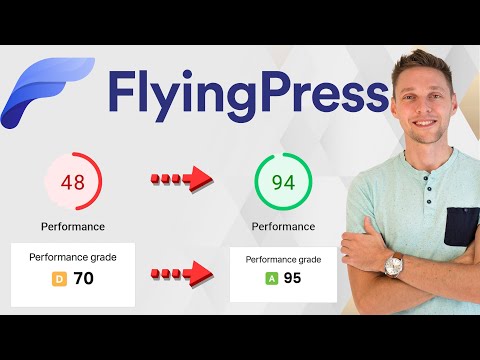
In this FlyingPress Tutorial video we are going to optimize the speed of a WordPress website with the use of the FlyingPress plugin. 👇🏻👇🏻👇🏻 Start here 👇🏻👇🏻👇🏻 Do you want to support my channel? Leave a like or buy Divi / Elementor Pro with 10% discount via the link below. That will help me enormously to create these free videos for you and keep going! ⇒ Software that I recommend: ✅ Hosting & domain ⇒ https://wp.discount/host/ ✅ Best caching plugin ⇒ https://wp.discount/cache/ ✅ Divi with 10% discount ⇒ https://wp.discount/divi/ ✅ Elementor Pro ⇒ https://wp.discount/elementor/ ⇒ Top video's I recommend: https://www.youtube.com/watch?v=1ZyCXybC9GA https://www.youtube.com/watch?v=VL5j_YJgnLM https://www.youtube.com/watch?v=0yFyeW7vEjo https://www.youtube.com/watch?v=A__YwNZ5zE4 https://www.youtube.com/watch?v=ptCQ2OXm8e4 I want you to succeed with your website, so lets get started. ⏱️Timestamps⏱️ 0:00 What site are we optimizing 0:31 Get FlyingPress 1:04 Start scores 2:01 Install FlyingPress 2:35 FlyingPress Dashboard 3:16 Cache 4:32 CSS 5:01 JavaScript 6:15 Fonts 6:50 Images 8:33 iFrames 9:04 CDN 9:14 Bloat 13:25 Database 14:44 Settings 15:17 Check website functionality 16:02 End scores Thank you for watching! 😀 ✅For tips and tricks on getting the most out of WordPress, don't forget to subscribe: https://wpressdoctor.com/sub 📖Transscript📖 For this test we're gonna use this webshop which I created in my YouTube tutorial. It's an official WooCommerce powered webshop, with a mega menu over there it's fully interactive. And you can see everything moves when you touch it. We have beautiful backgrounds also moving backgrounds in here, so this is a running, working webshop. You can go to the products over there, you can actually buy them in here, and add them to cart and pay them with PayPal or credit card. The first thing we do is: we go to https://wpressdoctor.com/flyingpress/ or just click over there. And then we press enter. The first thing I notice here that the plans actually renew on a way cheaper basis. That's pretty awesome. So we're going to get the developer license over here press 'Buy now'. And we can choose to pay with PayPal or credit card. I'm gonna fill In all my information and I'm gonna press 'Pay with PayPal'. Once you have paid and logged in, you can download here Flying Press using this blue button. Click on it. We we're going to optimize this woocommerce webshop. To do this we're going to use three different tests. The first test we are using of course is Page Speed Insights so go over there, fill in your website - in my case this - and press 'Analyze'. Next test we're gonna run is Pingdom, select where you want to test it from. I say Germany and press 'Start test'. The last one is GTmetrix, also fill it in and press 'Test your site'. The results of the test with Page Speed Insights is not that good. We have not a very good score on mobile 48. And on desktop we have only a 60. that is because we have not optimized this website at all. So we're gonna test FlyingPress to see how this works. Pingdom is also not very impressed with our website so far. It has a D and it gives us a score of 70. GTmetrix tested it from Vancouver in Canada and it's well it's a C so it could do way better than this. Next step is log into your WordPress website. If you're still logging in using /wp-admin/... that's not a very safe way and you don't want to get hacked, so watch my tutorial about WordPress security right after this video. That's what I'm talking about - security very important. On our dashboard we go to 'Plugins' over there and we press 'Add new'. We press over here 'Upload plugin'. Select the FlyingPress plugin we've just downloaded. And then we press 'Install now'. Press 'Activate plugin'. It has been activated well done. Go to FlyingPress over here, go to settings. Welcome to the dashboard of FlyingPress. As you can see it is a very clean, very easy to manage. The thing you can do on your dashboard is actually Purge your caches, Preload and everything. You can see all these ways of purching everything and caches, but you can also do this up here - which is very easy, and sometimes you actually need it when you have changed somethings and you don't see it on the front en,d this is the way to change it. Now they also have a CDN. Hm I'm going to test this out in another video. I'm gonna walk you through all these settings of FlyingPress, so you know exactly how to set it up and to use the full power of FlyingPress. And then we're gonna test it out and see what happens to our scores. First we go to Cache over here. If you have a lot of people logging into your website - for example subscription websites - you need to enable this. If you don't have this, keep this disabled. Generate separate cash for mobile.... 📖 Read the rest of the transcript at https://wpressdoctor.com/ #wordpress #FlyingPress
No Recommendations Found
No products were found for the selected channel.