Home Assistant Automation Tutorial - Complete & easy to understand explanation 🦸♂️

simon42
@simon42About
simon42 ist dein Technik & Smarthome Kanal mit Infos, Tutorials und interessanten Reviews rund um Home Assistant
Latest Posts


Video Description
In this video, I'll show you everything you need to know about automations in Home Assistant. We'll start with triggers, take a closer look at conditions, and explore the possible actions. ... The whole thing is rounded off with many real-life examples, which will hopefully give you ideas on how to put what you've learned into practice 🙌 🔗 == BLOG POST ⇒ More information, code snippets for the cards shown & much more → https://www.simon42.com/home-assistan... ======== VIDEOS & PLAYLISTS ======== 📹 • Duscherkennung in Home Assistant einrichte... 📹 • Smart Home Hitzeschutz mit Rollos, Sonnenp... 📹 • Mit Home Assistant WhatsApp Nachrichten ve... 📹 • Langzeitdaten & Analyse in Home Assistant ... 📋 • Neu bei Home Assistant? → Starte hier 🚨 🛟 Need help with Home Assistant topics? → https://community.simon42.com -- Chapters 🎥 -- 00:00 - Intro 00:28 - Topic of today's video 01:17 - Recommended prior knowledge 01:46 - Definition: What is an automation in Home Assistant? 02:47 - How and where can you create automations in Home Assistant? 03:05 - Views and actions in the automation overview 04:48 - Creating a new automation 04:58 - Structure of an automation in Home Assistant 05:51 - Event trigger 06:26 - Geolocation trigger 07:32 - Device trigger explained 09:05 - Home Assistant trigger 09:15 - Calendar trigger 09:44 - MQTT trigger 10:38 - Numeric state trigger 11:27 - Sun trigger 11:41 - Tag trigger (NFC) 11:52 - Template trigger 12:53 - Webhook trigger 14:03 - Time trigger 14:36 - Time grid trigger 15:04 - Zone trigger 15:23 - State Triggers 16:51 - Displaying Automation Blocks in YAML Code 17:55 - Conclusion on Triggers 18:09 - Conditions of Automations 18:22 - What are Trigger IDs and how can we use them? 19:35 - Trigger ID Condition 19:58 - Nested OR condition explained using 2 trigger IDs 21:43 - Device condition 22:01 - Briefly discussing the non-condition 22:13 - Numeric state, AND operator, and sun as a condition 22:35 - Time condition 23:09 - General note on the complexity of automations 23:56 - Testing conditions directly in the automation 24:23 - Accessing help pages via the automation interface 24:40 - Actions 24:51 - Device: The most important action 25:40 - Executing automation actions directly 25:53 - Wait or delay action 26:06 - The select action (taking branches based on conditions) 27:57 - Other important actions (scene) 28:40 - If-Then action 28:57 - Running a service as Action 29:58 - Testing services outside of automations 30:47 - Playing media action 31:38 - How to turn off all devices in a domain with an automation? 32:09 - Practical examples of automations in Home Assistant (1: Trash notification) 34:17 - Automation example: Turning off air purifiers when air quality is good 36:07 - Switching input helpers via automations 36:50 - One-off automations 37:50 - Automation: Notify for high humidity explained (complicated) 44:15 - What are Blueprints and why are they so great? 45:31 - Where can you find these and other Blueprints? 46:21 - Conclusion on Home Assistant's Blueprint Exchange 47:06 - Inserting a Blueprint via Gist URL 47:26 - Blueprints for "remote control devices" such as buttons, switches, etc. #homeassistant #smarthome #iot



Smart Home Starter Kit Essentials
AI-recommended products based on this video

Amazon Echo Show 8 (newest model), With Spatial Audio, Smart Home Hub, and Alexa, Charcoal
Amazon Echo Show 8 (newest model), With Spatial Audio, Smart Home Hub, and Alexa, Charcoal
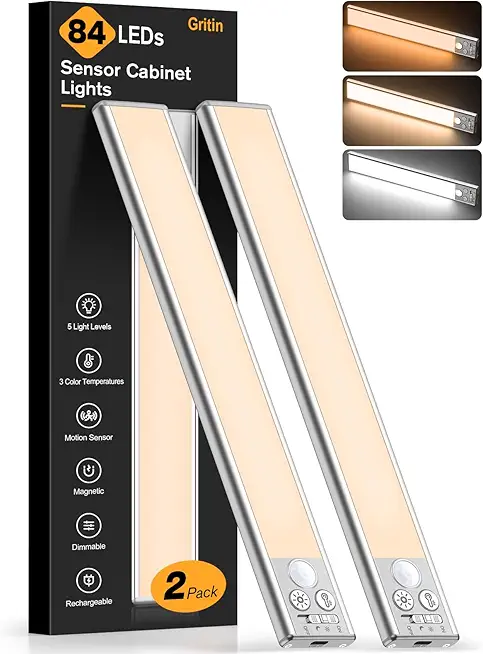
Gritin 10.2inch Under Cabinet Lighting Rechargeable -84 LED Super Bright,3-Color& 5 Level Brightness,4 Modes,Motion Sensor,Long Lasting- Easy Installation Magnetic Under Cabinet Closet Lights -2 Pack