How to Create a Divi Blog Post Template (using Divi Theme Builder)

Wade McMaster - Creator Impact
@wademcmasterAbout
Create Better images and video with the help of AI! Dive deep and create more visually compelling content and art. Tools, tutorials and advice on visual tools, AI Art and anything to create eye candy whislt learning how to make money from it in the process! CPP Dzine / OpenArt CPP


Video Description
Learn how to Create a Divi Blog Post Template using Divi Theme Builder. 🔥 DOWNLOAD DIVI: https://creatorimpact.com/downloaddivi Just Note that the above link is an affiliate link that helps to support this channel! You can use this information to add custom templates and design to Divi’s blog post formats. This tutorial is designed to help you customize your WordPress website easily with great results. Just note that some of the links below are affiliate links I earn commission from: // DOWNLOAD DIVI: https://creatorimpact.com/downloaddivi // FULL IN DEPTH DIVI TUTORIAL PLAYLIST (build a website, step by step): https://www.youtube.com/playlist?list=PLsaZXe5Zf2eHdnOQldePh8O3yyx036DSn --- ⚒ // TOOLS // ⚒ --- The following are the tools I use and highly recommend. Some of these are affiliate links I earn a commission from, but this is what I use and swear by! 📺 USED FOR MY VIDEOS: 🔴 Camtasia (screen recording): https://creatorimpact.com/camtasia 📷 Camera - Canon Rebel T7i: https://amzn.to/3Qzsi28 🎙 Nicama Lavalier Mic: https://amzn.to/3BR5OW3 🎙 Audio-Technica Mic: https://amzn.to/3PivRbH 🖥 WEBSITE / WORDPRESS BLOGGING 🌍 WebHosting Siteground:https://creatorimpact.com/siteground 🔥 Divi WordPress Theme: https://creatorimpact.com/downloaddivi ⚙ All in One SEO Premium Plugin: https://creatorimpact.com/aioseo 📩 EMAIL NEWSLETTER: 📈ConvertKit: https://creatorimpact.com/convertkit 😍 DESIGN & PHOTO EDITING: 👁 Adobe Photoshop: https://creatorimpact.com/adobephotoshop 👁 Canva: https://creatorimpact.com/canva 👁 Penji Graphic Design Service: https://creatorimpact.com/penji 🔸 FREE YouTube Thumbnails PSDs: https://creatorimpact.com/free-youtube-psds/ 🔥 PREMIUM YouTube Thumbnails PSDs: https://creatorimpact.com/youtube-thumbnail-psd-templates/ 🔸 FREE Facebook Cover Images PSDs: https://creatorimpact.com/free-facebook-psds/ 🔥 PREMIUM Facebook Cover Images PSDs: https://creatorimpact.com/premium-facebook-cover-image-psd-templates/ FREE PHOTOS: 🔸 Unsplash: https://unsplash.com/ 🔸 Pexels: https://www.pexels.com/ // LEARN MORE 🔗BEGINNER COURSE Build a website, set up your presence online and start earning money: https://creatorimpact.com/start-here/ // CREATOR IMPACT 🤘 Follow Creator Impact on Social Media! 🔗 Facebook: https://www.facebook.com/creatorimpact 🔗 Instagram: https://www.instagram.com/creatorimpact/ 🔗 Twitter: https://twitter.com/creatorimpact // TIMESTAMPS 0:00 - Intro & Assigning the Layout 2:47 - Adding in the Main Modules & Layout 4:54 - Testing the base Layout 6:19 - Adding Call to Actions 8:15 - Styling the Header 12:54 - Styling Post Content & Sidebar Width/Visibility 16:11 - Styling 1st Call to Action 18:37 - Styling Comments 19:16 - Style Bottom Call to Action This Divi theme tutorial is for beginners and is a part of our series showcasing how to make a WordPress website with Divi - an in-depth series of WordPress tutorials showing you how to make a Divi website by breaking down the individual areas and walking through how they work, step by step. We show you how to use this powerful theme in a number of ways! We cover: - Designing your base template (using the customizer or the theme builder) - A beginner Divi visual builder tutorial - How basic design options and modules work - a variety of page layouts you can build and download. The theme used here is called Divi (Elegant Themes top WordPress Theme). It is a complete and comprehensive WordPress page builder along with a site-wide editor known as the Divi theme builder. // LEARN MORE Our Full Divi Theme Playlist: https://www.youtube.com/playlist?list=PLsaZXe5Zf2eFg-p1XXTV5mQYOwa3LAYZx Exploring the Full Width Header Module: https://www.youtube.com/watch?v=arkChwLeTlw How to set up a Divi Full Width Slider: https://www.youtube.com/watch?v=VC3o3d7jc98 Exploring all Divi Builder Modules: https://www.youtube.com/watch?v=vtGGNm8p4KY









Gaming PC Essentials Under $500
AI-recommended products based on this video
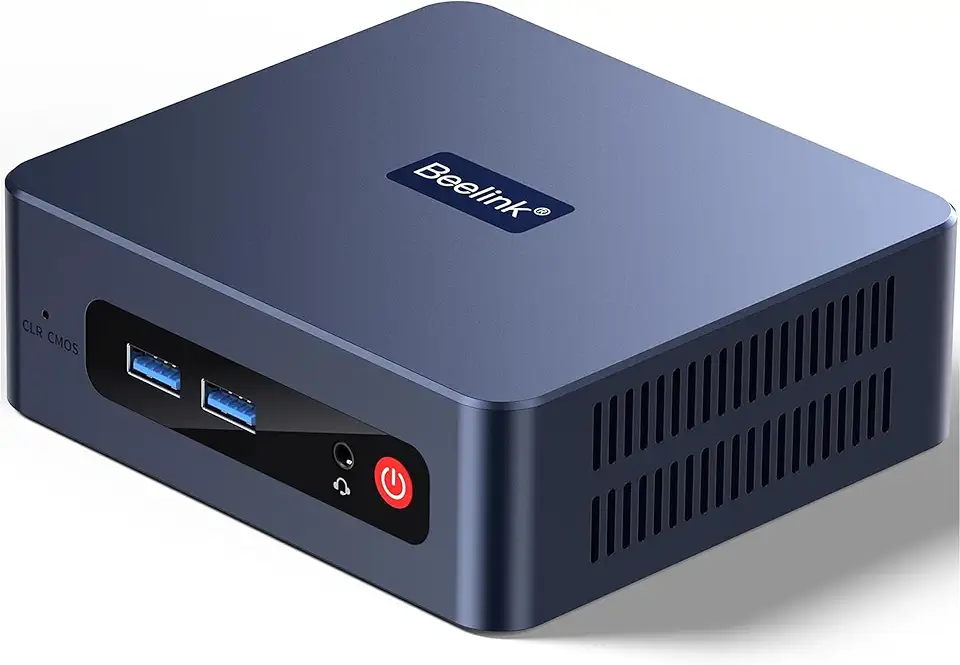
Beelink SER3 Mini Desktop PC with AMD Ryzen 3 3200U 2C/4T, 16GB DDR4 500GB PCIE3.0 X4 SSD, Dual Display Output, WiFi6/BT5.2 W-11 Pro Mini Gaming Computer

Beelink SER3 Mini PC, AMD Ryzen 3 3200U(14nm, 2C/4T) up to 3.5GHz, Mini Gaming Computer 16GB DDR4 RAM 500GB PCIE3.0 X4 SSD, Micro PC 4K@60Hz Dual Display, Mini Computer WiFi6/BT5.2/HTPC/W-11 Pro
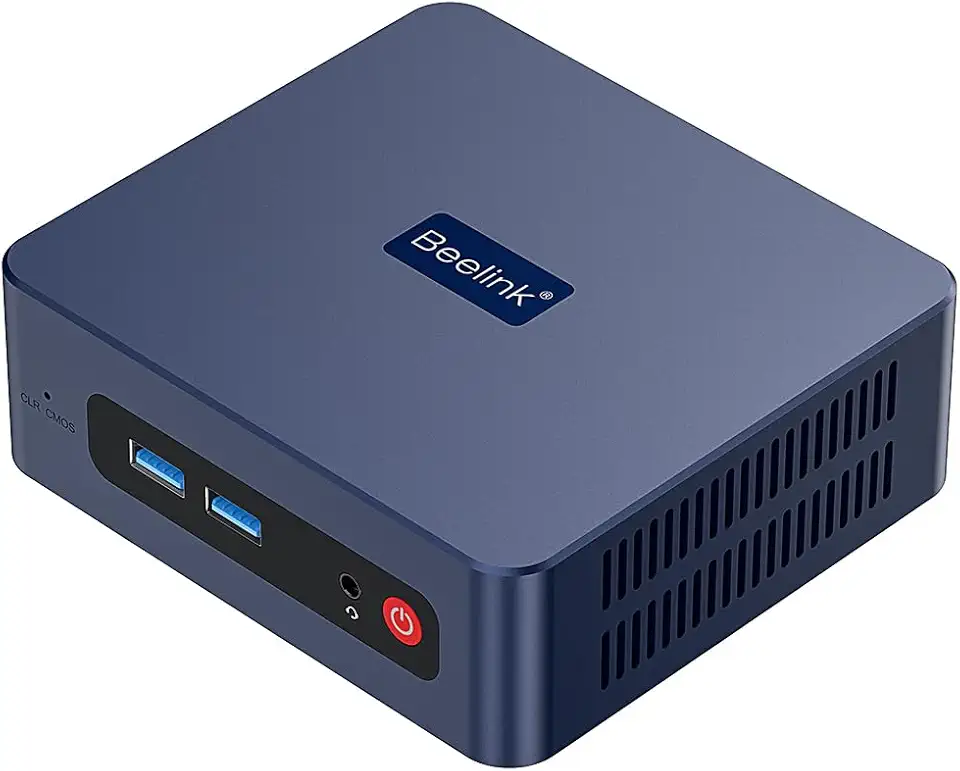
Beelink SER3 Mini PC, AMD Ryzen 3 3200U(up to 3.5GHz) 2C/4T, Mini Computer 16GB DDR4 RAM 500GB SSD, Mini Desktop Computer 4K@60Hz Dual HDMI Display WiFi6/BT5.2/WOL/HTPC/W-11 Pro

Corsair Vengeance LPX 32GB (2 X 16GB) DDR4 3200 (PC4-25600) C16 1.35V Desktop Memory - Black

Gaming Mini PC N2 Pro, Ryzen 7 6800H, 32GB DDR5 512GB M.2 NVME SSD, Radeon 680M Mini Computers, Uual USB4 8K UHD, Quad Display, WiFi 6E, BT-5.2, Mini Desktop PC/11 Pro/Office

MSI Codex Z2 Gaming Desktop: AMD R7-8700F, GeForce RTX 5070, 32GB DDR5, 2TB m.2 NVMe SSD, USB Type-C, VR-Ready, Windows 11 Home : A8NVP-436US

BOSGAME P3 Lite Mini PC, AMD Ryzen 7 6800H Mini Computer (8C/16T, up to 4.7GHz), 24GB DDR4 1TB M.2 NVMe SSD, Triple Display Desktop Gaming PC, Pre-in Win 11 Pro, Dual LAN, WiFi 6E, BT 5.2

ORIGIMAGIC N1 Mini PC, Ryzen 7 5825U(8C/16T, UP to 4.5GHz) 32GB RAM 1TB M.2 NVMe SSD, Mini Computer 4K Quad Display/Dual USB-C(Support Data/PD3.0/DP) /WiFi 6E/BT5.2, Light Gaming/Office

EVA Storage Bag for GTX 1660 Super, RTX 2060 Super, 3060 Ti, and 3070 Graphics Cards, 40 x 36 x 5 cm, Compact Protective Case with Dust-Resistant Design, Black
EVA Graphics Card Storage Bag 1660 Super, for RTX 2060 Super, for RTX 3060 Ti 3070 40 x 36 x 5 cm, Black

CORSAIR Hydro X Series iCUE Link XH405i Custom Cooling Kit – Hardline Water Cooling Loop – XC7 Elite CPU Water Block – XD5 Elite D5 Pump Res – XR5 360mm Radiator – 3X QX120 RGB Fans

Logitech G203 Wired Gaming Mouse, 8,000 DPI, Rainbow Optical Effect LIGHTSYNC RGB, 6 Programmable Buttons, On-Board Memory, Screen Mapping, PC/Mac Computer and Laptop Compatible - Black

HyperX Cloud II - Gaming Headset, 7.1 Surround Sound, Memory Foam Ear Pads, Durable Aluminum Frame, Detachable Microphone, Works with PC, PS5, PS4, Xbox Series X|S, Xbox One – Red
Logitech G203 Wired Gaming Mouse, 8,000 DPI, Rainbow Optical Effect LIGHTSYNC RGB, 6 Programmable Buttons, On-Board Memory, Screen Mapping, PC/Mac Computer and Laptop Compatible - Black

Logitech G305 Lightspeed Wireless Gaming Mouse, Hero 12K Sensor, 12,000 DPI, Lightweight, 6 Programmable Buttons, 250h Battery Life, On-Board Memory, PC/Mac - Black
