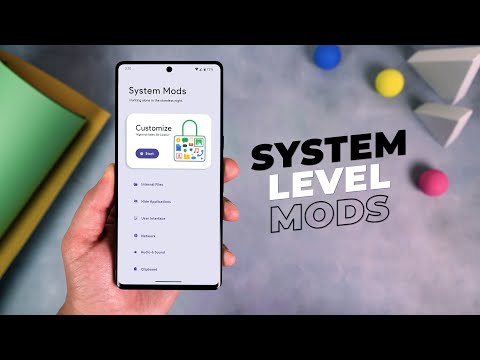
How to Install and Setup Shizuku on Android


Explaining Android
@explainingandroidAbout
Hi, my name is Doug and I love getting to spend time with my girlfriend Shaylah. I deal with anxiety just about every day. I'm a shy, introverted person by nature but I have a passion for technology. This is where I upload all of my Android tips and tutorial videos. My goal here is to create a repository for as many tips and device tutorials as possible. Helping folks to learn about the device most of us keep on our person's all day.
Latest Posts



Video Description
If you've found an application that requires Shizuku then I can walk you through how to install it and how to set it up properly on Android. ~~~~~ Hi! Don't forget to like the video, subscribe to the channel, and hit the "Thanks" button on this video, if you can, and join our channel community here - https://www.youtube.com/channel/UCnowc_KHgjVNj3Y-E-oQ8aw/join Video Description ~~~~~~~~~~~~~~~~~ I have the Google Pixel 7 Pro here and in today's video I will be showing you how to install and setup the popular application called Shizuku. Android is a highly customizable mobile operating system on its own, but you can take this a step further by using ADB commands. There are even some apps that require root access that can let you completely change the way the OS works. For example, I use a root app called ACC to limit my daily driver to only charge up to 80% to prolong the life of my battery. Some people are adverse to using ADB because it require you to connect the smartphone or the tablet to the PC and manually type out commands using a command line interface. But Shizuku is an application that can grant those special permissions directly on your device. It allows 3rd-party applications to access system-level APIs on Android that would normally require the user to execute ADB commands. The only requirement for this to work is that the application itself must be programmed with Shizuku in mind. Shizuku is an open-source project that's currently being maintained by Rikka, Haruue, and some other seasoned developers. Now, the initial setup of Shizuku does require you to execute an ADB command. . .unless you have root access already. If you are currently rooted, you can simply tap the Start button right here. If you don't have a PC to execute an ADB command, you can set up Shizuku using the Wireless Debugging feature mentioned here. In today's video, I'll be using the simple ADB method. It does require a PC that has ADB & Fastboot tools installed, though. You could also use the wireless debugging feature to execute ADB commands without a PC. This is mentioned in the Shizuku app itself. For us to execute this ADB command to get the Shizuku service running, we need to make sure USB Debugging Mode has been enabled. This is done via the Developer Options menu, if you haven't enabled it already. And with that done, we can connect the phone to the PC with a USB cable. Let's go ahead and type out the command adb devices to that we can make sure our computer recognizes the smartphone or tablet that is connected. Now, we need to drop into an ADB shell first and then we can execute the SH command required to start the Shizuku service. This will either need to be typed out manually, or you can copy the line and paste it into the command prompt with a right click of your mouse. Once you finish, we're going to press enter on the keyboard and that should be all that is required. Let's look at the smartphone or tablet that we're doing this on to make sure the Shizuku app says the service is running. As long as you see the Shizuku service is running then we have completed this setup. If you ever restart your smartphone or tablet then you need to manually start the Shizuku service again. This will either require you to execute that ADB command again. . .or you can do it all directly on the device itself by following the Wireless Debugging instructions included in the app. Mentioned Links ~~~~~~~~~~~~~~~~~ ADB & Fastboot Tools - https://www.youtube.com/watch?v=ic5HIG4r8cE Shizuku App Page - https://play.google.com/store/apps/details?id=moe.shizuku.privileged.api USB Debugging Mode - https://www.youtube.com/watch?v=IdaNab8iVXA Developer Mode - https://www.youtube.com/watch?v=uwR2HIstT-c Mentioned Commands ~~~~~~~~~~~~~~~~~ adb shell sh /sdcard/Android/data/moe.shizuku.privileged.api/start.sh Step by Step Tutorial ~~~~~~~~~~~~~~~~~ 1. Intro [00:00] 2. Install the Shizuku app [01:45] 3. Drop into an ADB Shell [04:35] 4. Execute the SH command [05:56] 5. Check to make sure the Shizuku service is running [06:50] As an Amazon associate, I may earn a commission on sales from the links below. The Gear I Use ~~~~~~~~~~~~~~~~~ 5W "Slow" Charger - https://amzn.to/2OaUMV8 Fast Charger - https://amzn.to/3rtBsC6 MicroUSB Cable - https://amzn.to/38dkpeM USB-C Cable - https://amzn.to/2OqlTvi TPU Cases - https://amzn.to/38g9b9w USB-C to 3.5mm Dongle - https://amzn.to/3rVt7c3 USB-C to 3.5mm DAC - https://amzn.to/3CyksSJ NVIDIA Shield TV - https://bit.ly/3KA17RV



![1 A.M Study Session 📚 [lofi hip hop]](https://imgz.pc97.com/?width=500&fit=cover&image=https://i.ytimg.com/vi/lTRiuFIWV54/hqdefault.jpg)














Essential DJI Mini SE Accessories
AI-recommended products based on this video
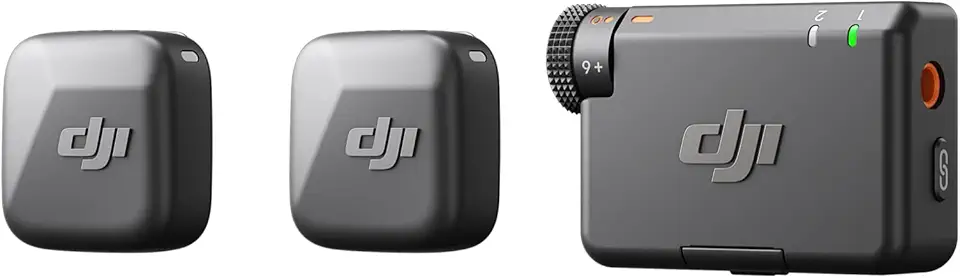
DJI Mic Mini (2 TX + 1 RX), Detail-Rich Audio, Wireless Lavalier Microphone for Camera/Android, 2-Person Vlog, Team Production
DJI Mic Mini (2 TX + 1 RX), Detail-Rich Audio, Wireless Lavalier Microphone for Camera/Android, 2-Person Vlog, Team Production
DJI Mic Mini (2 TX + 1 RX), Detail-Rich Audio, Wireless Lavalier Microphone for Camera/Android, 2-Person Vlog, Team Production
DJI Mic Mini (2 TX + 1 RX), Detail-Rich Audio, Wireless Lavalier Microphone for Camera/Android, 2-Person Vlog, Team Production
DJI Mic Mini (2 TX + 1 RX), Detail-Rich Audio, Wireless Lavalier Microphone for Camera/Android, 2-Person Vlog, Team Production
DJI Mic Mini (2 TX + 1 RX), Detail-Rich Audio, Wireless Lavalier Microphone for Camera/Android, 2-Person Vlog, Team Production
DJI Mic Mini (2 TX + 1 RX), Detail-Rich Audio, Wireless Lavalier Microphone for Camera/Android, 2-Person Vlog, Team Production
DJI Mic Mini (2 TX + 1 RX), Detail-Rich Audio, Wireless Lavalier Microphone for Camera/Android, 2-Person Vlog, Team Production
DJI Mic Mini (2 TX + 1 RX), Detail-Rich Audio, Wireless Lavalier Microphone for Camera/Android, 2-Person Vlog, Team Production