How to Use Microsoft Teams for Beginners Tutorial
About
No channel description available.
Latest Posts


Video Description
✅ Download the free demo file and follow along here ➡️https://www.simonsezit.com/ms-365-teams-exercise-file Embark on a comprehensive journey into the heart of Microsoft Teams 365 with our latest tutorial. We kick things off by demystifying the essence of Microsoft Teams, showcasing its transformative impact on modern teamwork. Unravel the intricacies of the Teams interface, from the navigation bar to the command bar, ensuring you become adept at navigating its powerful features. Dive into the world of team creation and collaboration with a focus on both public and private teams. Our step-by-step guide ensures you can effortlessly create and join teams tailored to your specific needs, fostering a dynamic and organized digital workspace. Master the art of messaging within Teams, covering everything from posting and receiving messages to bookmarking, editing, and deleting them, with a dedicated exploration of private messages to maintain confidentiality. Efficient teams and channel management are vital for a streamlined workspace. Learn how to gracefully handle team exits and customize your Teams interface with tabs and search optimizations. As you delve into optimizing meetings and calls, gain insights into initiating on-demand calls, scheduling future engagements, and leveraging collaboration features such as screen and file sharing. Elevate your collaboration game with advanced features like live integration with PowerPoint and Excel during meetings, brainstorming with digital whiteboards, and utilizing breakout rooms for dynamic collaboration. Subscribe now to stay ahead in the realm of seamless collaboration and become a Microsoft Teams 365 expert! 📊💡 #MicrosoftTeams365 #CollaborationMastery #techtutorial ✅ Download the free demo file and follow along here ➡️https://www.simonsezit.com/ms-365-teams-exercise-file 📝 Use the timestamps below to navigate to different sections of the course. If you already know one of these topics, skip ahead! 00:00:00 - What is Microsoft Teams? 00:02:49 - Explore the Teams Interface 00:08:35 - Create of Join Public & Private Teams 00:17:01 - Post and Receive Messages 00:23:25 - Bookmark, Edit and Delete Messages 00:26:33 - Private Messages 00:32:27 - Manage Teams and Channels 00:38:48 - Leave, Hide or Delete a Team 00:42:03 - Add Tabs and Search in Teams 00:48:13 - Setup for Meetings and Calls 00:52:48 - Initiate a Video/Audio Call on Demand 01:03:44 - Schedule a Video or Audio Call 01:10:26 - Share Your Screen and Files 01:16:12 - PowerPoint and Excel Live in Meetings 01:20:25 - Brainstorm Ideas with Whiteboard 01:27:51 - Breakout Rooms 01:34:40 - Exercise 🌍 Get unlimited training with Simon Sez IT’s 200+ courses ⏩ https://www.simonsezit.com/courses/ 🚀 Supercharge your skills with a FREE 14-day trial to our extensive training library. Learn from 10,000+ ad-free videos and begin your transformation today! ➡️ https://simonsezit.lpages.co/ssit-14-day-free/ 💻Watch more popular tutorials from Simon Sez IT: ✅Excel 2021 tutorials for beginners playlist here 👉https://www.youtube.com/playlist?list=PLzj7TwUeMQ3jqRlmIaj6jb_X9EGQueMDb Check out our FREE 300+ hour training course playlist here ➡️ 🔥https://www.youtube.com/playlist?list=PLzj7TwUeMQ3hsADWJd2sJh4o8jATTyaRU ✅Microsoft Office 2021 and Office 365 Training Tutorials playlist 👉https://www.youtube.com/playlist?list=PLzj7TwUeMQ3hH_MxteY6LR3OSMHpDkt_j ✅Microsoft Office 2019 Training Tutorials for Beginners playlist 👉https://www.youtube.com/playlist?list=PLzj7TwUeMQ3i2OE0G9fSMaVjcW4qi_z_7 ✅ Working from home toolkit, take a look at this playlist 👉https://www.youtube.com/playlist?list=PLzj7TwUeMQ3jyThSMlBb7nCGfbIga3hT1 💬Stay in touch! ✅SimonSezIT.com: 👉https://www.SimonSezIT.com/ ✅StreamSkill.com: 👉https://StreamSkill.com/ ✅YouTube Channel: 👉https://www.youtube.com/user/simonsezittraining ✅LinkedIn: 👉https://www.linkedin.com/company/simon-sez-it/ 🔔Subscribe to our channel: https://www.youtube.com/simonsezittraining?sub_confirmation=1 If you enjoyed the video, please give a "thumbs up" and subscribe to the channel 👍🏽 ;-)
You May Also Like






DIY Phone Stand Must-Haves
AI-recommended products based on this video
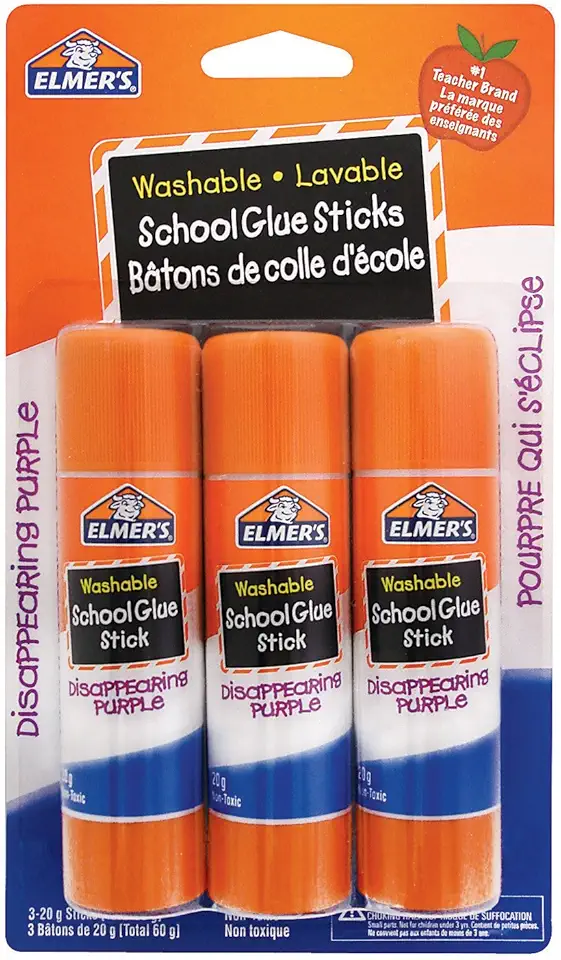
Elmer's Disappearing Purple School Glue Stick, 20G, 0.7-Ounce Each, 3-Pack (61666Q)

Adhesive Remover Spray, Sticker Lifter Liquid Tape Multifunctional Glue Remover Adhesive Spray, 120ml Safely Removes Stickers Labels Decals Tape Chewing Gum Grease Tar Crayon Glue

IMGadgets 47 x 24 Inches Height Adjustable Electric Standing Desk 2024, 5th Gen Quieter Motor Ergonomic Sit Stand Up Home Office Computer Desk with Height Memory Buttons, Display, 2 Headphone Holders

BESIGN LSX7 Laptop Stand with 360° Rotating Base, Ergonomic Adjustable Notebook Stand, Riser Holder Computer Stand Compatible with Air, Pro, Dell, HP, Lenovo More 10-15.6" Laptops (Black) Recycled Claim Standard Blended

Zewwen Laptop Stand for Desk, Ergonomic Adjustable Foldable Computer Stand with Heat-Vent, Aluminium Alloy Laptop Riser Compatible with MacBook Air, Pro, Dell XPS, Samsung, 10”-16"

Zewwen Laptop Stand for Desk, Ergonomic Adjustable Foldable Computer Stand with Heat-Vent, Aluminium Alloy Laptop Riser Compatible with MacBook Air, Pro, Dell XPS, Samsung, 10”-16"

LEGO Icons Williams Racing FW14B & Nigel Mansell F1 Model Car Kit - Building Set for Adults, Ages 18+ - F1 DIY Craft for Display - Gift Idea for Fans of F1-10353

LEGO Icons Leonardo da Vinci's Flying Machine DIY Kit - Ornithopter Building Set for Adults, Ages 18+ - Craft for Home or Office Decor with Display Stand - Gift Idea - 10363

Koolmox Koolmox Canvas Grocery Bag, 6-Pack 22'' Large Bags with Reinforced Handles, 12 Oz Heavy Duty Reusable Washable Grocery Shopping Bags Plain Bags for Teacher Paint Embroidery Draw DIY Art Craft Totes
