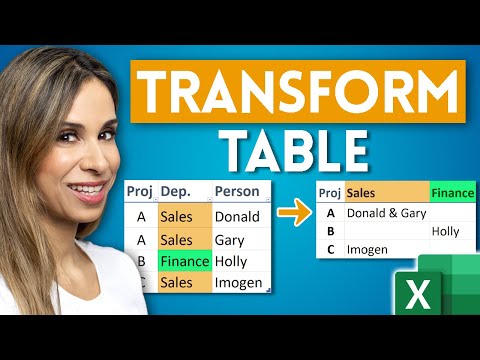
Quick Excel Trick to Unstack Data from one Column to Multiple Columns


Leila Gharani
View ChannelAbout
Excel. Power Query. Copilot. ChatGPT. Power BI. PowerPoint. You use them every day to automate Excel and your work - so why not actually master them? I’ll show you how to: ✔️Automate the stuff that drives you nuts ✔️ Spend less time on grunt work, more time on wow work ✔️ Build reports that look good AND actually make sense What You’ll Learn Here: ✔️ Excel, Power BI, PowerPoint, VBA, Google Sheets & more ✔️ AI-powered Excel & the future of work ✔️ Data & finance skills that give you an edge I don’t just teach this stuff - I use it daily. My goal? To help you think differently about the tools you already have, so you can work faster, and with confidence. 🎓 My background: MA in economics / Economist / Business Consultant / Accounting Systems Expert / Oracle & SAP implementations (for Finance) / Teacher & Microsoft MVP 💡 400,000+ professionals have taken my courses at XelPlus - because working smarter just makes sense. Join here 👉 https://www.xelplus.com/courses/
Latest Posts




Video Description
Join 400,000+ professionals in our courses here 👉 https://link.xelplus.com/yt-d-all-courses Master the art of unstacking column data in Excel with our straightforward and time-saving method. Say goodbye to complex formulas and embrace a simpler approach! ⬇️ DOWNLOAD the workbook here: https://pages.xelplus.com/unstack-file In This Tutorial, You Will Learn: ▪️ Unstacking Basics: Understand the fundamentals of converting single-column data into multiple columns. ▪️ The Replacement Trick: Discover our unique, efficient technique for unstacking data effortlessly. ▪️ Custom Number Formatting: Learn how to hide zeros and clean up your data presentation with custom formatting. ▪️ Dynamic Data Adjustments: See how changes in your source data automatically reflect in your unstacked columns. This trick is the easiest (or laziest) method to unstack data from one column to multiple columns. You might come across a case where you need to move data (or transpose data) from one column to multiple columns. If you Google this, you'll find different ways of doing this such as: 1. Using Excel array functions or the INDEX function 2. Power Query to unstack data 3. Excel macros for unstacking data 4. Excel add-ins that can unstack. In this Excel tutorial, we'll take a look at the easiest method of unstacking data. The good thing with this method is that it's dynamic so if your source data change, the stacked version also updates automatically. 🔑 What You'll Learn: - How to unstack data from one column into multiple columns. - A quick and easy method that skips complex VBA, Power Query, or array formulas. - Applying a clever trick for dynamic data adjustment. 🎯 Key Features: - Learn to unstack data without relying on complex formulas or add-ins. - Gain insights into managing and organizing Excel data efficiently. - Discover a handy trick for keeping your data dynamic and up-to-date. 00:00 How To Unstack Column Data in Excel 00:41 Unstack Data from ONE Column to MULTIPLE Columns 03:18 Hide Zeros Out of View in Excel Using Custom Number Formatting You'll find a similar trick used in these videos: Transpose data: https://youtu.be/yYVokk0NdiI Hack formula copy: https://youtu.be/zWhGVZ-R-6g ➡️ Join this channel to get access to perks: https://www.youtube.com/channel/UCJtUOos_MwJa_Ewii-R3cJA/join 👕☕ Get the Official XelPlus MERCH: https://xelplus.creator-spring.com/ 🎓 Not sure which of my Excel courses fits best for you? Take the quiz: https://www.xelplus.com/course-quiz/ 🎥 RESOURCES I recommend: https://www.xelplus.com/resources/ 🚩Let’s connect on social: Instagram: https://www.instagram.com/lgharani LinkedIn: https://www.linkedin.com/company/xelplus Note: This description contains affiliate links, which means at no additional cost to you, we will receive a small commission if you make a purchase using the links. This helps support the channel and allows us to continue to make videos like this. Thank you for your support! #excel






























Excel Mastery Must-Haves
AI-recommended products based on this video

CERAKOTE® Ceramic Headlight Restoration Kit – Guaranteed To Last As Long As You Own Your Vehicle – Brings Headlights Back to Like New Condition - No Power Tools Required - 10 Wipe Kit
