Will Microsoft Loop replace OneNote? Microsoft Loop vs. OneNote - 10 Features - Microsoft Loop Tips


Office Skills with Amy
@officeskillswithamyAbout
MICROSOFT 365 TRAINING & COACHING Empowering businesses to streamline Microsoft 365 workflows. I simplify learning Microsoft 365 products so that you can: 1️⃣ Navigate 365 apps with confidence, 2️⃣ Increase productivity, 3️⃣ And reclaim your time for meaningful work. 🔮 TECHNOLOGY VIDEOS TO COME Microsoft 365 apps including Microsoft Copilot, Microsoft Loop, Microsoft Teams, Microsoft Excel, Microsoft Word, Microsoft PowerPoint, Microsoft Outlook, Microsoft OneNote and more! ❓WHAT TOPICS ARE YOU MOST INTERESTED IN? Drop me a comment in a video and I will consider it for future content 🩵




Video Description
In this video, we are going to look at Microsoft Loop vs. OnteNote. We will compare 10 features of Microsoft Loop to Microsoft OneNote to determine if Microsoft Loop will replace OneNote in the future. If you are a student, teacher, project manager, business owner or super nerd like me, then we have got you covered! See below for more info and links referenced in this video: WHAT IS MICROSOFT LOOP If you are wondering what is Microsoft Loop then you can check out my first ever YouTube video to witness all of my awkwardness and learn about Microsoft Loop. The video is here: https://youtu.be/R8vQTzuKzQw WHAT IS A LOOP COMPONENT One of the greatest things about Microsoft Loop is the Loop Components, I have created a video here on what this looks like: https://youtu.be/lwBIio3WkbM MICROSOFT LOOP APP & ONENOTE APP This video uses the Microsoft Loop App and the Microsoft OneNote app that are included in your Office 365 suite. MICROSOFT ONENOTE This video will compare the 10 features mentioned in my 10 Tips to Better Notes in OneNote video. Please note that this video only scratches the surface of the functionality that is included in both products. https://youtu.be/me30kPmr6s8 MICROSOFT ONENOTE FILE PRINTOUT https://youtu.be/SCx1IFhIZtY OFFICE SKILLS WITH AMY Welcome to Office Skills with Amy! We create easy-to-follow and engaging how-to-technology videos to help you boost your productivity and save time in the office. DISCOVER YOUR INNER NERD We believe that being a 'nerd' is a term of pride, I personally, have been advertising myself as an Excel Nerd in interviews since 2009. Our goal is to inspire you to unleash the power of technology and Discover Your Inner Nerd along the way. We're here to show you how to make the most out of Microsoft 365 apps and other cutting-edge technology WHAT WILL YOU LEARN Whether you're a beginner or an experienced user, we'll help you become more efficient, automate tasks, and save time. NEW CONTENT WEEKLY With new content every week, we'll keep you up-to-date on the latest technology trends and help you stay ahead of the curve. TECHNOLOGY VIDEOS TO COME Microsoft 365 apps including Microsoft Office, Microsoft Loop, Microsoft Teams, Microsoft Excel, Microsoft Word, Microsoft PowerPoint, Microsoft Outlook, Microsoft OneNote and more! LIKE, COMMENT & SUBSCRIBE Don't forget to like, comment, and subscribe to our channel to show your support and stay tuned for more technology videos to come. Let's Nerd Out together and unleash the power of technology!










Upgrade Your Note-Taking Today
AI-recommended products based on this video

HATALKIN Case Compatible with Apple AirTags Case Keychain Air tag Holder Air Tag Key Ring Cases Air Tags Protective Cover Airtag Key Chain Loop Holders Silicone for Luggage Dog Cat Pet Collar 4 Pack
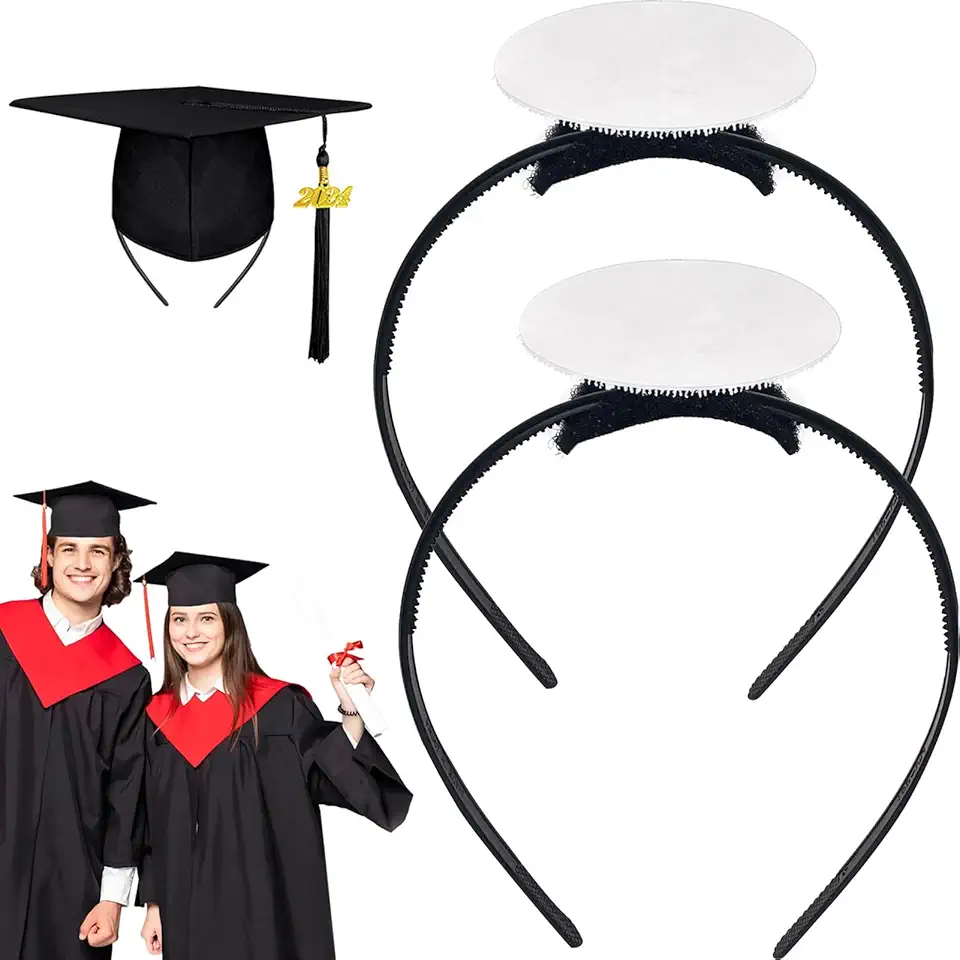
unibouti 2 Pack Graduation Cap Headband - Grad Cap Head Band Insert with Hook and Loop Sticker - Graduates Essential Hairband for Securing Graduation Hat

Samsung Galaxy Tab A9+ 27.94 cm(11.0 inch) Display, RAM 4 GB, ROM 64 GB Expandable, Wi-Fi, Tablet, (Gray)

Samsung Galaxy Tab A9+ 64 GB Graphite (CAD Version and Warranty)

Samsung Galaxy Tab S10 Ultra Gray 256GB - AI Tablet, 14.6", AMOLED 2X, Anti-Reflection, 420 Nits, Vapor Chamber, S Pen Included (CAD Version & Warranty)

Samsung Galaxy Tab A7 10.4" (32GB, 3GB) Ultra-Slim Wi-Fi Only Android 10 One UI Tablet, Snapdragon 662, 7040mAh Battery, SM-T503 (64GB SD Bundle) (Dark Gray)

Battery Cover for Xbox Series S, Cheap Replacement Back Shell Door Lid Repair Part to Microsoft Xbox Series X Controller, Black Batteries Port Cap Outside Case for New Xbox Core Wireless Remote,4 Pack

HQCME 9 Pack Lined Sticky Notes, 4X6 in, 9 Pastel Colors Large Ruled Stickies Colorful Super Sticking Power Memo Pads Strong Adhesive, Sticky Notes with Lines for Home, Office

Microsoft Office Home & Student 2019 | One-time purchase, 1 person | PC/Mac Keycard