How to handle Alerts in Selenium WebDriver


H Y R Tutorials
@hyrtutorialsAbout
Welcome to my channel H Y R Tutorials. If you are looking for learning something useful (related to automation testing) with some good explanation, then you are in the right place. In this channel I'm going to share the knowledge on various programming languages, technologies and tools, so please stay tuned to this. 🔗 YouTube - https://www.youtube.com/hyrtutorials 🔗 Website - https://www.hyrtutorials.com 🔗 Facebook - https://www.facebook.com/hyrtutorials 🔗 Twitter - https://twitter.com/hyrtutorials 🔗 Instagram - https://www.instagram.com/hyrtutorials 🔗 Telegram - https://t.me/hyrtutorials 🔗 LinkedIn - https://www.linkedin.com/company/hyrtutorials Kindly share this channel and website with your friends and help them as well. 🙏 Please Subscribe🔔 to start learning for FREE now, Also help your friends in learning the best by suggesting this channel.
Latest Posts



Video Description
In this video, I have shown how to handle Alerts in Selenium WebDriver. Selenium WebDriver is an open-source tool for automated testing of web apps across many browsers. WebDriver provides an API for working with the three types of native popup messages offered by JavaScript. These popups are styled by the browser and offer limited customization. 1) Alerts (Simple Alerts) The simplest of all javascript popups is referred to as an alert, which shows a custom message, and a single button that dismisses the alert, labeled in most browsers as OK. It can also be dismissed in most browsers by pressing the close button, but this will always do the same thing as the OK button. WebDriver can get the text from the popup and accept or dismiss these alerts. -------- Example -------- //navigate to the website driver.get("https://www.hyrtutorials.com/p/alertsdemo.html"); //Click the link to activate the alert driver.findElement(By.id("alertBox")).click(); //Wait for the alert to be displayed and store it in a variable Alert alert = wait.until(ExpectedConditions.alertIsPresent()); //Store the alert text in a variable String text = alert.getText(); //Press the OK button alert.accept(); 2) Confirm (Confirmation Alerts) A confirm box is similar to an alert, except the user can also choose to cancel the message. -------- Example -------- //navigate to the website driver.get("https://www.hyrtutorials.com/p/alertsdemo.html"); //Click the link to activate the alert driver.findElement(By.id("confirmBox")).click(); //Wait for the alert to be displayed and store it in a variable Alert alert = wait.until(ExpectedConditions.alertIsPresent()); //Store the alert text in a variable String text = alert.getText(); //Press the Cancel button alert.dismiss(); 3) Prompt (Prompt Alerts) Prompts are similar to confirm boxes, except they also include a text input. Similar to working with form elements, you can use WebDriver’s send keys to fill in a response. This will completely replace the placeholder text. Pressing the cancel button will not submit any text. -------- Example -------- //navigate to the website driver.get("https://www.hyrtutorials.com/p/alertsdemo.html"); //Click the link to activate the alert driver.findElement(By.id("promptBox")).click(); //Wait for the alert to be displayed and store it in a variable Alert alert = wait.until(ExpectedConditions.alertIsPresent()); //Type your message alert.sendKeys("Hello Tester"); //Press the OK button alert.accept(); The operations that we can perform on these popups using selenium are, 1) Accept - Refers to clicking on the Ok button. 2) Dismiss - Refers to clicking on the Cancel button. 3) SendKeys - Refers to entering text into a textbox available in the prompt box. 4) GetText - Refers to get the label text present on the popup box. Webpage used for practice in this video is as follows: https://www.hyrtutorials.com/p/alertsdemo.html ============================================== ************** Checkout my other playlists ************** ============================================== Java Programming videos playlist:👇 🔗 https://bit.ly/3keRJGa Selenium WebDriver with Java videos playlist:👇 🔗 https://bit.ly/2FyKvxj Selenium interview questions videos playlist:👇 🔗 https://bit.ly/3matUB3 Windows automation with FlaUI videos playlist:👇 🔗 https://bit.ly/33CG4dB CSS Selectors videos playlist:👇 🔗 https://bit.ly/2Rn0IbD XPath videos playlist:👇 🔗 https://bit.ly/2RlLdkw Javascript Executor videos playlist:👇 🔗 https://bit.ly/2FhNXwS Apache POI videos playlist:👇 🔗 https://bit.ly/2RrngrH Maven videos playlist:👇 🔗 https://bit.ly/2DYfYZE How to fix Eclipse errors:👇 🔗 https://bit.ly/3ipvNYf ============================================== ============================================== Connect us @ 🔗 Website - www.hyrtutorials.com 🔗 Facebook - www.facebook.com/HYRTutorials 🔗 LinkedIn - www.linkedin.com/company/hyrtutorials 🔗 Twitter - www.twitter.com/Hyrtutorials ============================================== ============================================== 🙏 Please Subscribe🔔 to start learning for FREE now, Also help your friends in learning the best by suggesting this channel. #hyrtutorials #selenium #alerts #webAutomation how to handle alerts in selenium,selenium webdriver,selenium webdriver tutorial,alerts in selenium webdriver,alerts/popups in selenium,handling alerts in selenium,handling pop-ups in selenium,how to handle javascript alerts,types of alerts in selenium,simple alert,prompt alert,confirmation alert,how to handle popup using seleium webdriver,handling popups,how to get alert text in selenium webdriver,javascript popup box




Essential DJI Mini 3 Pro Accessories
AI-recommended products based on this video
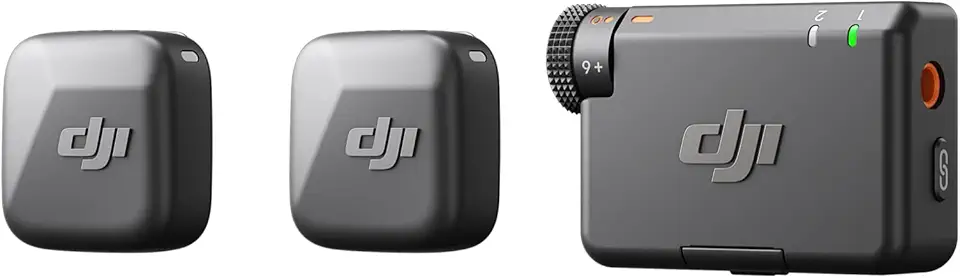
DJI Mic Mini (2 TX + 1 RX), Detail-Rich Audio, Wireless Lavalier Microphone for Camera/Android, 2-Person Vlog, Team Production
DJI Mic Mini (2 TX + 1 RX), Detail-Rich Audio, Wireless Lavalier Microphone for Camera/Android, 2-Person Vlog, Team Production
DJI Mic Mini (2 TX + 1 RX), Detail-Rich Audio, Wireless Lavalier Microphone for Camera/Android, 2-Person Vlog, Team Production
DJI Mic Mini (2 TX + 1 RX), Detail-Rich Audio, Wireless Lavalier Microphone for Camera/Android, 2-Person Vlog, Team Production
DJI Mic Mini (2 TX + 1 RX), Detail-Rich Audio, Wireless Lavalier Microphone for Camera/Android, 2-Person Vlog, Team Production
DJI Mic Mini (2 TX + 1 RX), Detail-Rich Audio, Wireless Lavalier Microphone for Camera/Android, 2-Person Vlog, Team Production
DJI Mic Mini (2 TX + 1 RX), Detail-Rich Audio, Wireless Lavalier Microphone for Camera/Android, 2-Person Vlog, Team Production
DJI Mic Mini (2 TX + 1 RX), Detail-Rich Audio, Wireless Lavalier Microphone for Camera/Android, 2-Person Vlog, Team Production
DJI Mic Mini (2 TX + 1 RX), Detail-Rich Audio, Wireless Lavalier Microphone for Camera/Android, 2-Person Vlog, Team Production
DJI Mic Mini (2 TX + 1 RX), Detail-Rich Audio, Wireless Lavalier Microphone for Camera/Android, 2-Person Vlog, Team Production
DJI Mic Mini (2 TX + 1 RX), Detail-Rich Audio, Wireless Lavalier Microphone for Camera/Android, 2-Person Vlog, Team Production