Reimagining Business Process Automation with Agent Loop in Azure Logic Apps


Microsoft Reactor
@microsoftreactorAbout
Welcome to Microsoft’s Reactor YouTube Community. Whether you’re building your career or the next great idea, Microsoft Reactor connects you with the devs and startups that share your goals. Learn new skills, meet new peers, and find career mentorship. Attend expert panels and dive into what inspires you with the latest tech. Virtual events are running around the clock so join us anytime, anywhere! We want this to be a safe, welcoming community, so these are our house rules. If you violate them, we will delete your comments and may report violations: 1. Avoid explicit and inflammatory language 2. No swearing or hate speech 3. Do not post repetitively or spam our comment section 4. Do not post personal information, such as email, physical address, personal phone number, credit card information, or your site password Please report posts that violate community guidelines using the spam button or YouTube’s Reporting and Enforcement Center. Be nice to each other and try to be helpful.
Latest Posts
Video Description
Conventional automation executes instructions in order yet modern business scenarios demand reasoning and adaptation. With the new Agent Loop capability in Azure Logic Apps, you can build agentic business processes that adapt to goals, handle retries intelligently and dynamically decide the next step. In this session, you’ll learn how to combine LLM reasoning with 1,400+ Logic Apps connectors to create workflows that classify, summarize, triage, and resolve tasks in real time. We’ll walk through patterns like nested loops, handoffs, and per-user connections to run processes on behalf of signed-in users. Expect live demos, practical patterns, and reusable templates you can take back to your own projects to make workflows smarter, adaptive, and scalable without heavy scaffolding. 📌 This session is a part of a series! Learn more here - https://aka.ms/AIS/series Resources: - http://aka.ms/la-agent-in-a-day - https://aka.ms/lalabs - https://aka.ms/agentloopdemos - http://aka.ms/mcp-demos Chapters: 00:08 - Welcome and Housekeeping 01:06 - Meet the Speakers 01:19 - Reimagining Business Processes with Agent Loop 02:12 - What Are Agentic Workflows? 04:07 - Introducing Agent Loop in Azure Logic Apps 05:24 - Power of Out-of-Box Connectors 08:11 - Building Autonomous and Conversational Agents 10:09 - Observability and Multi-Agent Collaboration 12:46 - Demo: Recruitment Agent with OBO Authentication 17:08 - Connecting Agents to Data Sources via MCP Servers 19:57 - Demo: Salesforce MCP Server Integration 24:25 - Security and Enterprise Readiness 26:20 - Observability and Human-in-the-Loop Oversight 28:09 - Developer Experience: Low Code to Pro Code 30:48 - Agent Loop in a Day Workshop Overview 33:50 - Deep Dive: ITSM Agent Workflow in Azure Portal 37:14 - Run History and Agent Chat Traceability 40:41 - Task Timeline and Incident Lifecycle 42:30 - Roadmap: What's Coming to Logic Apps 45:51 - Model Hosting and MCP Server Enhancements 48:45 - Surface Agents in Microsoft Teams 50:03 - Closing Thoughts and Resources #MicrosoftReactor #learnconnectbuild [eventID:26308]







Streamline Workflow with Azure Logic Apps
AI-recommended products based on this video

Microsoft Office Home & Student 2019 | One-time purchase, 1 person | PC/Mac Keycard

ASUS ExpertBook P5; Copilot+ PC, 14” Business Laptop, Intel® Core™ Ultra 7 Processor 258V, 32GB RAM, 1 TB SSD, WiFi 6E, Windows 11 Home, Misty Grey, P5405CSA-DH71-CA
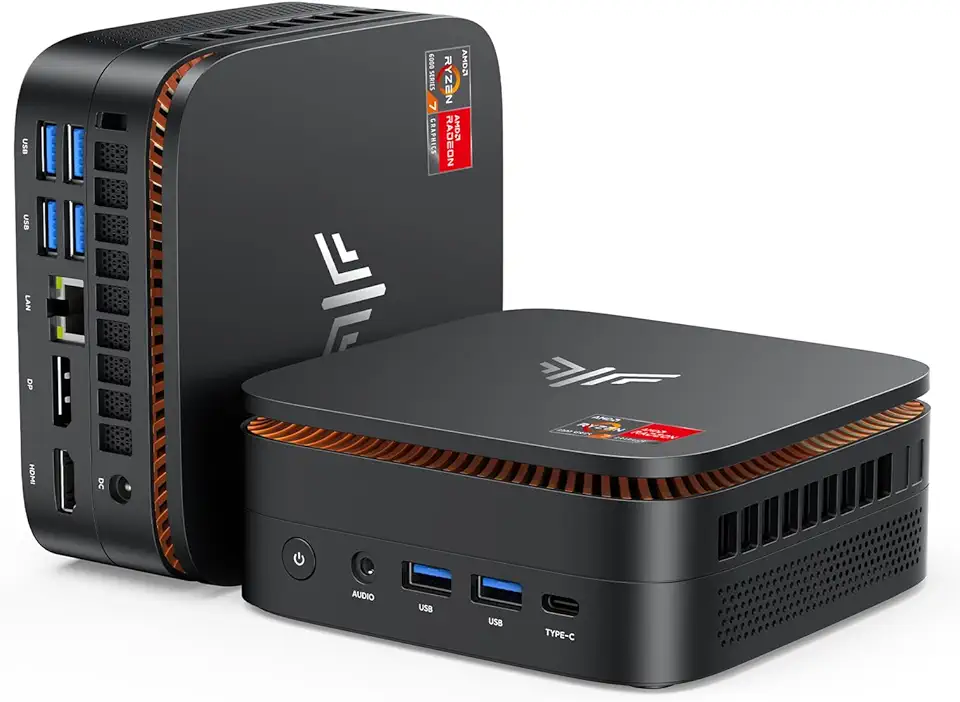
KAMRUI Hyper H1 Mini PC W-11 Pro, AMD Ryzen 7 6800H Processor (up to 4.7GHz), Mini Desktop Computers with 32GB RAM 512GB M.2 SSD, Micro Computer Support 4K UHD for Home Server Business Office Global Recycled Standard

15.6 Inch Laptop with Office 365, 4GB RAM 128GB Storage Expandable 1TB, 5205U Processor, Windows 11 Laptops Computer, HD Display, Wi-Fi 5, BT4.2, Type-C, Numpad, for Students and Business. ClimatePartner certified
