Sonoma 14.3.1 Update! What's New? + OCLP 1.3.0 Issues [DEEP DIVE]


Mr. Macintosh
@mr.macintoshAbout
Apple Macintosh & macOS how-to videos covering new and old Macs!
Latest Posts


Video Description
Apple just released the 4th minor update for macOS Sonoma 14.3.1. In this video, I'll go over all the details that you will need to know about this update. Plus I'll cover OpenCore Legacy Patcher 1.3.0 support for macOS Sonoma 14.3.1 on Unsupported Macs. CHAPTERS BELOW! 0:00 macOS Sonoma 14.3.1 Update Welcome and intro 0:49 Full Apple update releases list = iOS 17.3.1, iPadOS 17.3.1 & watchOS 10.3.1 1:33 Using System Settings to download & install the Sonoma 14.3.1 update 2:02 What is the new build number of the 14.3.1 Update? What about Beta? 2:55 What about Rapid Security Response updates (RSR’s) for macOS Sonoma ? 3:17 How long did the macOS Sonoma 14.3.1 update take to Install? 3:43 M1/M2/M3 Firmware update & T2 Intel Firmware 4:02 macOS Sonoma 14.3.1 Full installer & M1/M2/M3 IPSW Restore file 4:16 What’s new in the macOS Sonoma 14.3.1 Update? 4:34 Security content of the macOS Sonoma 14.3.1 Update 4:52 What’s new in updates for macOS Sonoma 5:29 What’s new in Enterprise in Sonoma 14.3.1 Update? 6:12 About this Mac - Model & Year now correctly displayed! 6:53 macOS Sonoma 14.3.1 Update Geekbench 6 Benchmarks 7:20 macOS Sonoma 14.3.1 compatibility with OCLP 1.3.0 7:54 DEMO: If the Auto KDK download patcher does not start 8:48 Does your Mac need the Kernel Debug Kit download? A full list 9:38 If the KDK is NOT downloading before the Sonoma 14.3.1 Update 10:35 How do we know what the latest KDK Is? The OCLP KDK GitHub Page! 11:04 Sonoma 14.3.1 KDK Released 6 HOURS after the Update was released!!! 11:37 New Recommendation! Check KDK page first OR wait at least 6 Horus before updating OS 12:11 DEMO: how to manually download KDK and install it. 15:26 If the Automatic Root Patcher system does NOT pop up after the 14.3.1 update 16:27 How to download the KDK when you don’t have wifi? Ethernet or USB copy 17:20 What to do if your Mac is stuck on a black login screen after the 14.3.1 Update? 18:21 Looking at the OCLP KDK GitHub site to find out what the latest KDK is 18:48 The KDK auto download system is downloading 14.3 Beta KDK issue. 20:01 If you have a beta version of the 14.3 KDK, how to install 14.3.1 KDK if you wanted to 21:13 Testing Sonoma 14.3.1 on a MacBook Pro 15-inch (Mid 2017) 21:38 Testing Sonoma 14.3.1 on a MacBook Pro 15-inch (Mid 2014) 22:42 Testing Sonoma 14.3.1 on a Mac Pro (Late 2013) - Had a few issues 23:06 Update on my macOS update Content Caching Server + future video 23:52 Testing Sonoma 14.3.1 on a Mac mini (Late 2012) 24:18 Testing Sonoma 14.3.1 on a MacBook Pro 17-inch (Late 2011) 24:30 Looking at the OCLP patcher log in /Users/Shared 25:30 Testing Sonoma 14.3.1 on a MacBook 13-inch (Mid 2010) 26:09 Other hardware models I should be testing? Mac Pro 2010? iMac? 26:25 Do I recommend installing the Sonoma 14.3.1 update? 27:27 Did you update to macOS Sonoma? Or are you going to wait? 28:03 Thank You!!! The macOS Sonoma 14.3.1 Update was released on 2/08/24 @ 12:04 CDT My macOS Sonoma 14.3.1 Update Article https://mrmacintosh.com/macos-sonoma-14-3-1-update-23d60-whats-new/ Manual Kernel Debug Kit (KDK) download site https://github.com/dortania/KdkSupportPkg/releases Does your Unsupported Mac need the KDK Download? If you have a Mac with a dedicated Intel GPU or Nvidia GPU, you do NOT need the KDK.* You only need the KDK if you have an AMD GPU *You also need the KDK if you have a Mac with a USB 1.1 Controller. MacBook - Mid 2010 and older MacBook Air - Late 2010 and older MacBook Pro - Mid 2010 and older iMac - Late 2009 and older Mac mini - Mid 2011 and older Mac Pro - Mid 2010 and older Examples: 2012 Mac mini with Intel GPU? NO KDK 2013 MacBook Pro with NVIDIA GPU? = NO KDK 2013 Mac Pro with AMD GPU? = YES KDK 2011 MacBook Pro with AMD GPU? = YES KDK macOS Sonoma Apple Patch notes https://support.apple.com/en-us/HT213895 Apple Security Updates Page https://support.apple.com/en-us/HT201222 What's new for enterprise in macOS Sonoma https://support.apple.com/en-us/HT213893 OpenCore Legacy Patcher link https://github.com/dortania/OpenCore-Legacy-Patcher/ Apple KDK or Kernel Debug Kit manual download link https://github.com/dortania/KdkSupportPkg/releases Support Mr. Macintosh https://www.patreon.com/mrmacintosh http://paypal.me/mrmacintoshblog Download Full macOS Sonoma Installers InstallAssistant.pkg https://mrmacintosh.com/macos-sonoma-full-installer-database-download-directly-from-apple/ Download Full macOS Sonoma, Ventura, Monterey & Big Sur M1 M2 Apple Silicon IPSW Files https://mrmacintosh.com/apple-silicon-m1-full-macos-restore-ipsw-firmware-files-database/ Links https://MrMacintosh.com - Apple Mac Enterprise IT Blog & macOS News for MacAdmins Twitter https://twitter.com/ClassicII_MrMac Subscribe to "The Apple Ninja's" YouTube! If it wasn't for him, I would not even be on YouTube today. Thank you!!! https://www.youtube.com/channel/UCRddzq1GBchvbZqnVkioKnQ



![OpenCore Legacy Patcher 2.3.0 - 2.3.1 What Happened? [IMPORTANT INFO!]](https://imgz.pc97.com/?width=500&fit=cover&image=https://i.ytimg.com/vi/WpkZCCJw8kc/hqdefault.jpg)
![How To Backup & Restore Time Machine on OCLP Mac [FULL GUIDE]](https://imgz.pc97.com/?width=500&fit=cover&image=https://i.ytimg.com/vi/RXpenK5SiVc/hqdefault.jpg)
![Install macOS Sequoia on Unsupported Macs [EASY GUIDE ANYONE CAN DO IT!!!]](https://imgz.pc97.com/?width=500&fit=cover&image=https://i.ytimg.com/vi/rfa2aSm7OxQ/hqdefault.jpg)


Craft Wind Chimes Today
AI-recommended products based on this video

Ultra-Slim Bidet Attachment, Posterior&Feminine Wash-(Retractable Dual Nozzles), Non-Electric Bidet Attachment for Toilet Seat, Adjustable Fresh Cold Water Pressure, Stainless Steel Inlet (White)
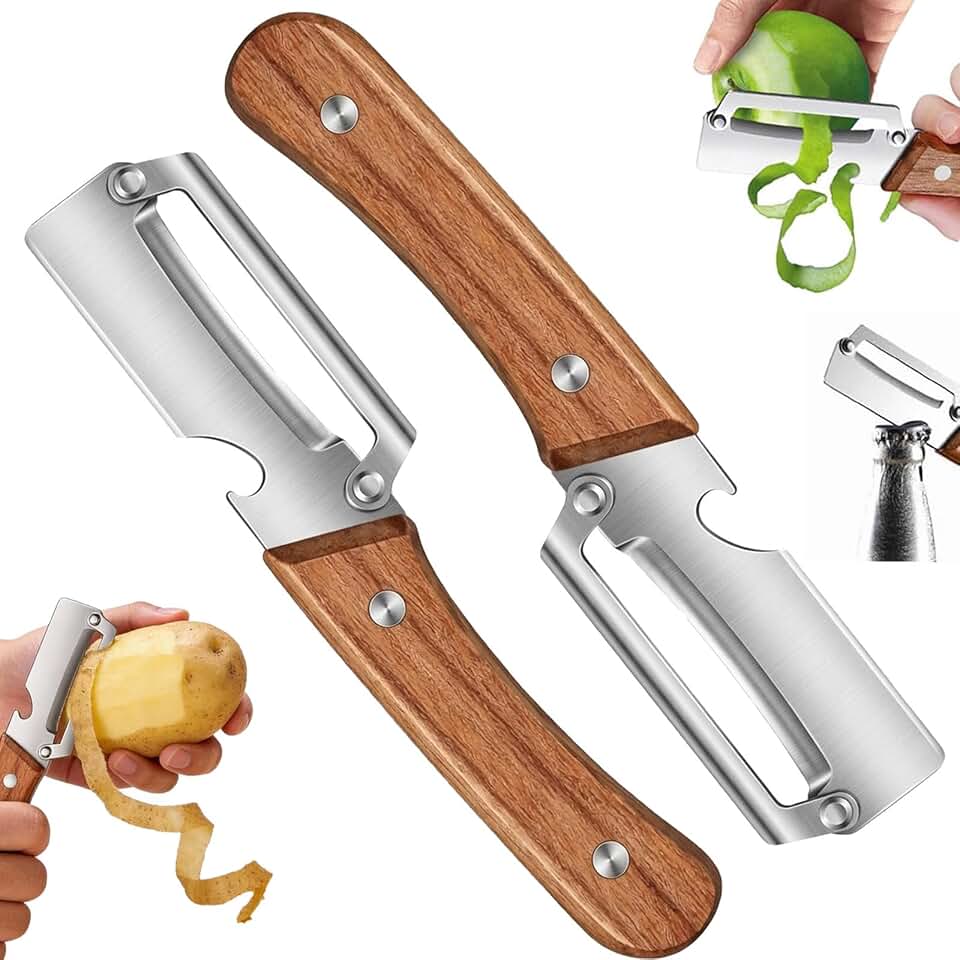
Multi-Functional Vegetable Peeler for Kitchen,Vegetable Peeler Wooden Handle,2-in-1 Stainless Steel Fruit & Vegetable Peelers with Bottle Opener for Potato Pineapple (2PC)
Ultra-Slim Bidet Attachment, Posterior&Feminine Wash-(Retractable Dual Nozzles), Non-Electric Bidet Attachment for Toilet Seat, Adjustable Fresh Cold Water Pressure, Stainless Steel Inlet (White)