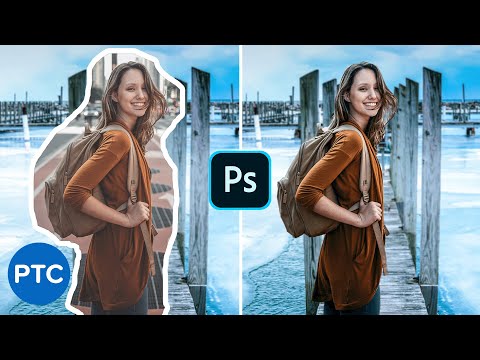
How To Match a Subject Into ANY Background In Photoshop! Compositing Tutorial

Photoshop Training Channel
@photoshoptrainingchannelAbout
Photoshop Tutorials for beginners. Hi, I'm Jesus Ramirez! I'm here to help you learn Adobe Photoshop and Lightroom! The Photoshop Training Channel (PTC) has been around since 2012. You will find professional Adobe Photoshop Tutorials for photo manipulation, compositing, retouching, text effects, and much more. I keep the tutorials concise, simple, and fluff-free. PTC's mantra is simple: "just show me how you did that." In my 20-year professional career, I've worked with some of the world's biggest brands, including Adobe, Microsoft, Motorola, and Conde Nast. Most recently, I've worked as a Finisher in the Hollywood industry, creating movie and TV posters for Netflix, HBO, Hulu, and CBS. Follow along with PTC to get accurate, no-hype, honest advice from someone who walks the walk and genuinely wants to help others. I'm here to serve you and help you learn Photoshop. 🙏 Subscribe now, and thank you for watching!

![Flawlessly Remove Dark Eye Circles in Photoshop! [Pro Technique]](https://imgz.pc97.com/?width=500&fit=cover&image=https://i.ytimg.com/vi/REt264jFvqE/hqdefault.jpg)

Video Description
POWERFUL techniques to match a subject into any background in Photoshop! In this Photoshop compositing tutorial, you will learn professional techniques to create realistic composites. We will cover everything from masking, matching perspective, matching color, and everything you need to match a person into any background. 📘 INDEX - Compositing Tutorial - Blend a Photo to a Different Background 00:00 - Introduction 01:48 - Place both images in the same Photoshop document. 02:35 - Make a mask to extract the model from her background. 11:00 - Match brightness of the composite. 16:41 - Match color of the scene. 19:15 - Match Saturation in the image. 19:52 - Blur Background 21:21 - Adjust the composite with Camera Raw 24:20 - Adjust and refine the details of the composite LINKS: Blur Backgrounds in Photoshop ► https://www.youtube.com/watch?v=mPp7h5ddQ3E Matching Perspective in Composites ► https://www.youtube.com/watch?v=OoHfZFl65fo Advanced Hair Masking in Photoshop ► https://www.youtube.com/watch?v=qV1DAf5cYXE Tutorial Assets ► https://photoshoptrainingchannel.com/match-a-subject-into-any-background-in-photoshop/ Become an Adobe Stock Contributor: ► http://bit.ly/stock-contributor PTC Newsletter: ► http://ptcvids.com/subscribe Premium Tutorials: ► http://ptcvids.com/shop Website: ► photoshoptrainingchannel.com FOLLOW ME Instagram: ► http://instagram.com/jrfromptc Facebook Group: ► http://ptcvids.com/group Twitter: ► https://twitter.com/JRfromPTC LinkedIn: ► https://linkedin.com/in/jesusramirez9 CREDITS ● Stock Images provided by stock.adobe.com ● Photoshop video tutorials by Jesus Ramirez #PhotoshopTutorial #Photoshop #PTCvids
![Remove Backgrounds In Photoshop 2025 [EASY For Beginners!]](https://imgz.pc97.com/?width=500&fit=cover&image=https://i.ytimg.com/vi/_PNUQDm6lrA/hqdefault.jpg)





![Apply Rim Light In Photoshop [Pro Hollywood Technique Revealed!]](https://imgz.pc97.com/?width=500&fit=cover&image=https://i.ytimg.com/vi/H-z0j2jVka8/hqdefault.jpg)

Boost Your Compositing Skills
AI-recommended products based on this video
