Router USB Port Explained: What Can You Do With It

NetWork From Home
@network-from-homeAbout
At NetWork from Home, my goal is to help everyone get the most out of their home internet connections. I will break down the technical concepts surrounding home networks so you are comfortable making decisions that maximize your internet connection and allow you to safely access the internet.
Latest Posts



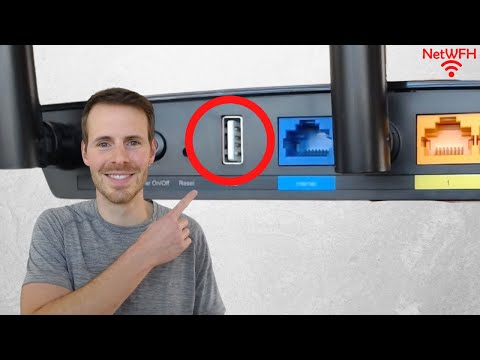
Video Description
In this video, I discuss what the USB port on your router can be used for. I also provide an example of how to use your router to share files on your home network. For more content on similar topics, check out my YouTube channel: https://www.youtube.com/channel/UCs-hXDMwqs1Ri9Yh9QRgaqQ If you would like to read about other ways to improve your home network, check out my blog: https://www.network-from-home.com 1:08 What the USB port on your router is meant to be used for 4:16 How to share files using your router’s USB port 10:21 Security considerations when sharing files through your router This post contains affiliate links. This means I may earn a commission should you choose to sign up for a program or make a purchase using my link. The router I used in this video is a TP-Link Archer A7 router: https://amzn.to/3ZMgvnn Other equipment I used in this video: 🎥: https://amzn.to/4nkDDV3 🎙️: https://amzn.to/4kU1SXU What is the USB port on your router for? The USB port on your router was designed to be used in a few different ways. The downside of this is that some of the intended functionality of the USB port on your router is no longer useful. That’s why many newer routers today don’t have USB ports anymore. If your router has a USB port, however, it can be used to provide the following functionality: --Providing your home network with a networked printer: before printers had wireless capabilities, you could connect your printer to the USB port on your router. This allowed all the devices connected to your home network to use the printer. With that said, all printers now have wireless capabilities, so this use case isn’t really useful unless you have a really old printer without wireless functionality --Update your router’s firmware: Using the USB port on your router, you can download updated firmware onto a USB stick and transfer it to your router through a USB. This use case also isn’t very helpful today, because routers can be updated either by accessing the router’s settings directly, or remotely using a mobile device --Share files with devices in your home network: If you connect a USB to the USB port on your router, you can share the files on the USB with the devices in your home network. This is a use case that is still viable today, even though there are other options available for sharing files (via cloud, network attached storage, etc.). For example, you may have pictures, media, or account usernames and passwords that you want to make available to anyone on your home network. Your router allows you to do this easily with its USB port Conclusion If you have any questions about how you can use the USB port on your router, please leave a comment below.
You May Also Like







Boost Your Networking Potential
AI-recommended products based on this video

TP-Link AC1300 USB WiFi Adapter (Archer T3U) - 2.4G/5G Dual Band Wireless Network Adapter for PC Desktop, MU-MIMO WiFi Dongle, USB 3.0, Supports Windows 11/10/8.1/8/7/XP, Mac OS 10.9-10.14

TP-Link AC1300 High Gain WiFi USB Adapter (Archer T4U)- Dual Band Wireless Network Adapter for Desktop with 2.4GHz/5GHz High Gain Antennas, MU-MIMO, Support Windows 10/8.1/8/7/XP, Mac OS

TP-Link Mini - AC600 USB 2.0 Wifi Adapter (Archer T2U Nano) - 2.4G/5G Dual Band Wireless Network Adapter for PC Desktop, Mini Travel Size, Supports Windows 11/10/8.1/8/7/XP, Mac OS 10.9-10.15

TP-Link USB WiFi Adapter for Desktop PC (Archer T3U Plus) - AC1300Mbps USB 3.0 WiFi Dual Band Network Adapter with 2.4GHz/5GHz High Gain Antenna, MU-MIMO, Windows 11/10/8.1/8/7/XP, Mac OS 10.9-10.15

NETGEAR AC600 Wi-Fi USB 2.0 Mini Adapter for Desktop PC | Dual Band WiFi Stick for Wireless Internet (A6100-10000S), Black
TP-Link USB WiFi Adapter for Desktop PC (Archer T3U Plus) - AC1300Mbps USB 3.0 WiFi Dual Band Network Adapter with 2.4GHz/5GHz High Gain Antenna, MU-MIMO, Windows 11/10/8.1/8/7/XP, Mac OS 10.9-10.15

TP-Link USB to Ethernet Adapter (UE306) - Foldable USB 3.0 to Gigabit Ethernet LAN Laptop Network Adapter, Supports Nintendo Switch, Windows, Linux, Apple MacBook OS 10.11- OS 12, Surface
TP-Link AC1300 USB WiFi Adapter (Archer T3U) - 2.4G/5G Dual Band Wireless Network Adapter for PC Desktop, MU-MIMO WiFi Dongle, USB 3.0, Supports Windows 11/10/8.1/8/7/XP, Mac OS 10.9-10.14
NETGEAR AC600 Wi-Fi USB 2.0 Mini Adapter for Desktop PC | Dual Band WiFi Stick for Wireless Internet (A6100-10000S), Black
TP-Link USB to Ethernet Adapter (UE306) - Foldable USB 3.0 to Gigabit Ethernet LAN Laptop Network Adapter, Supports Nintendo Switch, Windows, Linux, Apple MacBook OS 10.11- OS 12, Surface
![TP-Link USB C To Ethernet Adapter (UE300C) - J45 To USB C [Thunderbolt 3/4 Compatible] Type-C Gigabit Ethernet LAN Network Adapter, Compatible With Apple MacBook Pro 2017-2023, MacBook Air, And More](https://m.media-amazon.com/images/I/418xZkoG-RL._AC_UY654_FMwebp_QL65_.jpg)
TP-Link USB C To Ethernet Adapter (UE300C) - J45 To USB C [Thunderbolt 3/4 Compatible] Type-C Gigabit Ethernet LAN Network Adapter, Compatible With Apple MacBook Pro 2017-2023, MacBook Air, And More
TP-Link USB to Ethernet Adapter (UE306) - Foldable USB 3.0 to Gigabit Ethernet LAN Laptop Network Adapter, Supports Nintendo Switch, Windows, Linux, Apple MacBook OS 10.11- OS 12, Surface
TP-Link USB C To Ethernet Adapter (UE300C) - J45 To USB C [Thunderbolt 3/4 Compatible] Type-C Gigabit Ethernet LAN Network Adapter, Compatible With Apple MacBook Pro 2017-2023, MacBook Air, And More

USB C Hub, MacBook Pro Adapter USB C Dongle with 4K HDMI,Thunderbolt 3 100W Power Delivery Port,USB C 5Gbps Data Port,SD/TF Card Reader,2 USB 3.0 Ports Compatible for MacBook Pro Air 2022/2021/2020

Anker 332 USB-C Hub (5-in-1) with 4K HDMI Display, 5Gbps - and 2 5Gbps USB-A Data Ports and for MacBook Pro, MacBook Air, Dell XPS, Lenovo Thinkpad, HP Laptops and More

USB C Docking Station Dual Monitor for Dell Hp,15-in-1 Laptop Docking Station 3 Monitors USB C Hub with Dual 4K HDMI,8K DP,Button,PD Charging,Ethernet,6 USB A&C,SD/TF, Audio USB-C Multiport Adapter

Buffalo LinkStation 210 4TB 1-Bay NAS Network Attached Storage with HDD Hard Drives Included NAS Storage That Works as Home Cloud or Network Storage Device for Home

Seagate Game Drive 4TB External Hard Drive Portable HDD - Compatible With PS4 (STGD4000400) blue

UnionSine 2TB Ultra Slim Portable External Hard Drive USB3.0 HDD Storage for PC,Mac, Desktop, Laptop, PS4, Xbox One, Xbox 360-Super Fast Transmission-HD-2510(Black)

Toshiba Canvio Gaming 4TB Portable External Hard Drive USB 3.0, Black for PlayStation, Xbox, PC, & Mac - HDTX140XK3CA

Western Digital 4TB Elements Desktop External Hard Drive, USB 3.0 external hard drive for plug-and-play storage - WDBWLG0040HBK-NESN

TP-Link 5 Port Gigabit Ethernet Network Switch (TL-SG1005D) - Plug and Play, Desktop or Wall Mount, Plastic Case, Ethernet Splitter, Fanless, Traffic Optimization, Unmanaged (TL-SG1005D)
TP-Link USB to Ethernet Adapter (UE306) - Foldable USB 3.0 to Gigabit Ethernet LAN Laptop Network Adapter, Supports Nintendo Switch, Windows, Linux, Apple MacBook OS 10.11- OS 12, Surface
